Showing posts with label Theme. Show all posts

Friday, 9 August 2013

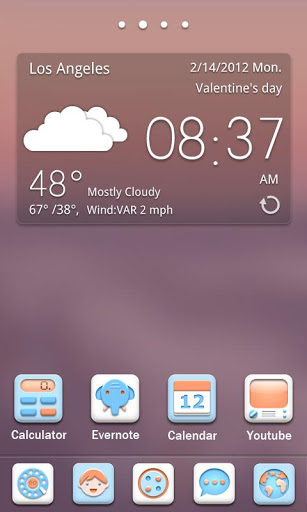
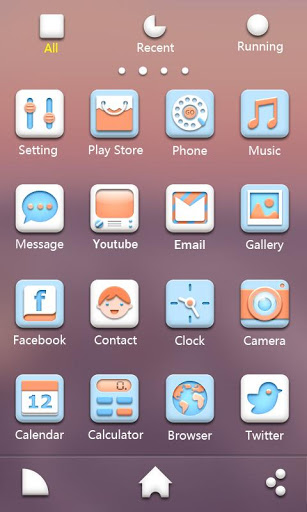
Soft GO Launcher EX Theme

Soft GO Launcher EX Theme-1 Soft GO Launcher EX Theme-2
Specially designed for GO Launcher EX, provides delicate app icons, wallpapers, folder and app drawer interface. Get it right now and have a completely new makeover of your Android smartphone.
Notice:
GO launcher theme is only available for phones with GO Launcher EX installed.
Search “GO Launcher EX” on Google Play Shop and install it for free.
***How to Apply the Theme
1. Directly open the theme after successful installation.
2. or back to Menu>Theme, choose a theme you like and apply it to your phone.
***How to Change Wallpaper
Click Menu>Wallpaper, and select the wallpaper you like.
***How to Change App Icons
(Some devices might not automatically apply the icons)
Long press some app icon>Replace>Theme’s icon, and then choose the icon you like.
Thank you for your continued support. Feel free to contact us if you have any problems or suggestions.


0 comments

Monday, 5 August 2013

Galaxy S4 Live Wallpaper 1.0.6

  • Like us on facebook
  • Android Apk
  • Water Cooler
  • On Facebook
Galaxy S4 Live Wallpaper, beautiful water drop ripple effect with floating light particles. Now with dragging light particles option that is similar to original Samsung Galaxy S4 lock screen effect. Weather you have power to own Galaxy S4 or not but now you have power to own its live wallpaper all for just free.
To use: Home -> Menu -> Wallpapers -> Live Wallpapers
To develop more free great live wallpapers, we have implemented some ads in settings.
Advertisement can support our develop more free great live wallpapers.
This live wallpaper has been tested on latest devices such as Samsung Galaxy S3, Nexus 7, HTC Desire S and Sony Xperia S. Please contact us if your device is not supported.
Note: If your wallpaper resets to default after reboot, you will need put the app on phone instead of SD card.
Disclaimer/Trademarks
Galaxy S4 is a trademark of Samsung. This app is not affiliated with or endorsed by Samsung.

For Free Download CLick On Download & Enjoy!!!


0 comments

Sunday, 4 August 2013

LAUNCHER 8 PRO v2.0.0 Apk

Launcher 8 pro:
★More energy efficient,fluent and powerful functional.
★Can free download all premium themes.
★Complete experience all the features of the launcher 8.
★Support horizontal/vertical screen Themes.
All income will be put into research and development, to make products better
Launcher 8 is a great app for you can ease of imitation WP8/IOS 7 and other styles start screen,fully personalized,free DIY and more variety of exciting themes.
【Features】
- You can add different size tiles;
- You can add a variety of color tile;
- You can save and restore the theme;
- You can edit the start screen layout;
- You can set the current background style;
- You can switch the application list style
- You can add Android widgets in the tiles;
- You can set the wp8 style lock screen and status bar;
- You can select more than one hundred kinds of theme colors;
- You can add special features tiles,like time,flashlight,pictures and contact photo.
What’s New
More energy efficient,fluent and powerful functional.
Can free download all premium themes.
Complete experience all the features of the launcher 8.
Support horizontal/vertical screen Themes.


0 comments

Taskbar – Windows 8 Style (Premium) v2.1 Apk

Taskbar – Window 8 style is a tool that mimics Window 8 Taskbar. It comes in handy when you want to launch apps, common settings, favorite contacts quickly.
Recommended by AddictiveTips.
Hotest Apps by AppBrain.
Features
☆ “Start” button
Tap on the “start” button to open taskbar. Scroll up/down to launch app. If you add folders, contacts, settings, click on theme to execute.
☆ Change start button location
Click an hold for a while, then move around to change its location.
☆ Smart “Start” button
Start button will be dimming if taskbar does not open in two seconds. It also learn the way you use “start menu” area and taskbar, then smartly adjust them for you.
☆ Reorder apps
Open setting > Edit start menu item, then drag the icon in the right and move to change item order.
☆ Hide apps
Open setting > Edit start menu item, then click on action bar > hide to exclude apps.
☆ Create folder
Open setting > Edit start menu item, then click on action bar > add new to add new folder. Type folder name, select icon and folder type.
Folder type includes:
- Applications
- Settings
- Contacts
- Bookmark
What’s New
Ver 2.0
- Support mixed folder
- Ability to add shortcut to primary list and mixed folder
- Improvements
. Simplify creating a folder
. Add new folder
. Add brightness settings as default
. Option for keyboard auto adjustment
- Fix bugs
. Change flash light to “Torch”
. Start button shows after reboot when it’s previously hidden


0 comments

Saturday, 3 August 2013

Pinkmusic Theme GO Launcher EX

Dear,you can search samskl find more theme what you like.thx
Email: 527samskl@gmail.com===Brief introduction:
Covers icons, wallpaper, folders
interface and app drawer. Get it and have a completely new makeover
of your smartphone with android OS at once!
===Important tips:
***This app only works with GO Launcher EX.
***Install GO Launcher free from the market first.
***How to Apply the Theme:
1.Please Do Not open directly after it's installed.
2.Back to GO Launcher EX: MENU > theme preferences.
3.Choose and apply the theme.
***Change icons:
Some devices may not change the icons automatically.
1.Tab and hold an app in desk screens.(Not available in app list.)
2.Replace > Choose the theme's icons.
***Circle Effect:
1.Only works in App list, MENU > Settings > Icon effect > Chariot
Thanks for your support!


0 comments

Music Theme GO Launcher EX

Dear,you can search samskl find more theme what you like..thx
Email: 527samskl@gmail.com
===Brief introduction:
Covers icons, wallpaper, folders interface and app drawer. Get it and have a completely new makeover
of your smartphone with android OS at once!
===Important tips:
***This app only works with GO Launcher EX.
***Install GO Launcher free from the market first.
***How to Apply the Theme:
1.Please Do Not open directly after it's installed.
2.Back to GO Launcher EX: MENU > theme preferences.
3.Choose and apply the theme.
***Change icons:
Some devices may not change the icons automatically.
1.Tab and hold an app in desk screens.(Not available in app list.)
2.Replace > Choose the theme's icons.
***Circle Effect:
1.Only works in App list, MENU > Settings > Icon effect > Chariot
Thanks for your support!


0 comments

Cool Blue Theme GO Launcher EX

Cool Blue version!
3 Cool Colors! All available now!
Designed by ZT.art Team! Covers icons, wallpaper, folders
interface and app drawer. Get it and have a completely new makeover
of your smartphone with android OS at once!
===Important tips:
***This app only works with GO Launcher EX.
***Install GO Launcher free from the market first.
***How to Apply the Theme:
1.Please Do Not open directly after it's installed.
2.Back to GO Launcher EX: MENU > theme preferences.
3.Choose and apply the theme.
***Change icons:
Some devices may not change the icons automatically.
1.Tab and hold an app in desk screens.(Not available in app list.)
2.Replace > Choose the theme's icons.
***Circle Effect:
1.Only works in App list, MENU > Settings > Icon effect > Chariot
Thanks for your support!
Problems and Suggestions to: ztart.theme@gmail.com

0 comments

ABLACK Theme GO Launcher EX


===Brief introduction:
Covers icons, wallpaper, folders
interface and app drawer. Get it and have a completely new makeover
of your smartphone with android OS at once!
===Important tips:
***This app only works with GO Launcher EX.
***Install GO Launcher free from the market first.
***How to Apply the Theme:
1.Please Do Not open directly after it's installed.
2.Back to GO Launcher EX: MENU > theme preferences.
3.Choose and apply the theme.
***Change icons:
Some devices may not change the icons automatically.
1.Tab and hold an app in desk screens.(Not available in app list.)
2.Replace > Choose the theme's icons.
***Circle Effect:
1.Only works in App list, MENU > Settings > Icon effect > Chariot
Thanks for your support!

0 comments

Dryad(Go Launcher Super Theme)

Preview the full version and upgrade, please click the fairy at the edge of the screen!If you want Dryad Super Theme Full Version, you can choose upgrade to full version by:
1. Pay with IAP ( In app purchase )
2. Get it for free with Getjar Gold
(Super Theme effects only available on GO Launcher EX v3.19 or above. If you haven't see the effects, please update your GO Launcher to the newest version. Thank you! )
Here comes our new Super Theme on GO Launcher EX!
Dynamic visual effects of touching, sliding, pressing and shaking.
Amazing animation effects adding more fun to your smartphone!
#Full version:
The complete Dryad Super Theme, only $3.99 now!
Adding more features! Once upgrade to full version, you can get butterfly with 2 types, 2 more clock types, new animation when pull down the clock, more customization with fun!
#Tips
Super Theme must be used on GO Launcher EX v3.19 or above.
#Introduction
Dryad GO Launcher EX Super Theme, specially designed for GO Launcher EX, provides amazing visual effects, delicate app icons, wallpapers, folder and app drawer interface. Get it right now and have a completely new makeover of your Android smartphone.
#Notice
1.Super Theme effects is only available for phones with GO Launcher EX V3.19 or above. Search “GO Launcher EX” on Google Play Shop and install it for free.
2.If you've installed the elder version of this theme, try to restart the Launcher after the installation.
3.If you've got any problems on this theme, try to restart the launcher or re-apply this theme. If the problem is still unsolved, please send us feedback.

***How to Apply the Theme
Menu>Theme, choose a theme you like and apply it to your phone.
***How to Change Wallpaper
Click Menu>Wallpaper, and select the wallpaper you like.
***How to Change App Icons
(Some devices might not automatically apply the icons)
Long press some app icon>Replace>Theme’s icon, and then choose the icon you like.
Thank you for your continued support. Feel free to contact us if you have any problems or suggestions.


0 comments

Thursday, 1 August 2013

NFC Task Lancher

Connect your phone to your world using NFC technology.
Pair your device with NFC tags using NFC Task Launcher and build your own personal assistant. Do you want to turn off your work email and text someone when you’re home with a tap inside your house? Or turn your phone on silent and set your alarm with a tap on your nightstand? This app lets you program your device to do the actions you do regularly.
The Wall Street Journal calls it “living in the future.”
With one phone-to-tag touch, here are examples of what you can do:
In your car: Turn on bluetooth, open GPS and and start your playlist
On your nightstand: Set your ringer to vibrate, dim your display and set an alarm
In your home: Allow a visitor to access your wifi network, no password necessary
The tags work with any NFC-enabled device. Anyone who scans the tag will have the same actions performed. Below are all the possible tasks – make your own combinations to automate your life. Actions can be performed in any order and in any combination. The only limit is what you can come up with!
Now supporting read-only tags & allowing you to write any amount of data to any tag using Tagstand’s cloud service. This allows you to use your tags just as you would any writable tag without worrying about size.
Some demos can be viewed on the application website
Create Tasks using NFC Tags, Bluetooth or WiFi connections. When using NFC Tags you can create a Switch task that will toggle between two tasks with each tap.
Tasks can be set up to do things like:
- Change WiFi, Bluetooth, mobile hotspot, airplane mode (root users in Jelly Bean and up), auto-sync, GPS (root users), and mobile data settings.
- Change your volumes or notification tones.
- Change your display brightness, timeout, auto-rotation, or notification light settings
- Check in on social media like Foursquare, Google Places, and Google Latitude
- Send messages using Twitter, SMS, Email, or Glympse
- Start or stop Applications (root required for stopping applications), dock modes, open URLs, speak text, or navigate to an address
- Set Alarms or create calendar events
- MORE!
We’re always working on adding new actions to Tasks. Please get in touch if there’s something you’d like to do that’s not currently offered.
This application supports NFC Forum Type 1, Type 2, Type 3 and Type 4 Tags as well as third party NFC Enabled tags like the MIFARE Classic, DESFire, Ultralight and Ultralight C.
All permissions are listed and explained here: https://launcher.tagstand.com/permissions
This app uses Google Analytics for aggregate, anonymous data collection, which can be opted out of from the settings page.

0 comments

Sunday, 28 July 2013

G-rule themes for GO Launcher

Free Download G-rule themes for GO Launcher
G-rule is the latest  free theme for GO Launcher EX!
Get  G-rule  FREE  now ,more cool icon for your mobile!

0 comments

Friday, 26 July 2013

Apex Launcher 2.0.4

Free Download Apex Launcher 2.0.4
Apex Launcher helps you create a customized homescreen experience on your Android (4.0+) device.“Fantastic app that has the potential to give your phone a complete makeover. I highly recommend it.” – MakeUseOf
“Even after a lot of customization, Apex Launcher feels super fast.” – Pocket Now
“We must say it is as smooth as butter.” – Droid Life Five Best Android Launchers – Lifehacker
The 25 Tastiest Apps for Ice Cream Sandwich – PCMag
Must-have apps for the Nexus 7 – ZDNet
Features:
• Customizable homescreen grid size and up to 9 homescreens
• Scrollable dock with up to 7 icons per page and up to 5 pages
• Infinite & elastic scrolling (homescreen, drawer and dock)
• Fancy transition effects (tablet, cube, etc.)
• Hide elements as you want (persistent search bar, status bar, or even the dock)
• Customizable icons and labels for shortcuts and folders
• Choose different folder preview styles and background
• Multiple drawer styles (transparent/opaque, horizontal/vertical, paginated/continuous)
• Drawer apps sorting (title, install date, mostly used)
• Hide apps from the drawer
• Lock your desktop to prevent accidental changes
• Enjoy homescreen gestures (pinch, swipe up/down, double tap)
• Advanced theme engine (icon packs, skins, etc.)
• Backup/restore settings and data
• Optimized for both phones and tablets
• Lots of other customization options!
Apex Launcher Pro (Paid Version) Features:
• Powerful drawer customizations (unlimited drawer tabs, folders in drawer)
• Unread count notifications (provided by the free Apex Notifier extension)
• Dock swipe actions (swipe up and down actions)
• More gesture options (two-finger gestures)
• Additional transition effects (accordion, cross, etc.)
• Flexible theme options (ADW, LauncherPro, Go Launcher themes)
• Enhanced folder support (batch add, merge folders)
• Advanced widget options (widgets in dock, overlapping widgets)
• More features on the way!
Tips:
• Pinch the screen to access screen previews (like Exposé or HTC Sense).
• Long press an icon to drag and drop it over another one to create a folder.
• Long press icons/folders on the desktop and choose edit from the popup menu to customize icons and labels.
• Drag, hover, and drop app icons over the delete button at the top of the screen to quickly uninstall apps.
• Long press an app in the hide apps list to quickly launch that app.
• Switch to single screen wallpaper mode to fix wallpaper zooming issues.
• Enable the Root Helper in advanced settings (root required, Android 4.0 only) to add widgets from the drawer.
Permissions:
• Access widget data: Only used to create and display widgets on the homescreen. (Android 4.1+ only)
• Application information: Used to display warnings when other launchers are running.
• Control vibration/Status Bar/Wallpaper: Standard launcher functions.
• Network communication: Used for anonymous usage/error reporting (optional).
• Phone calls: Used when you create direct-dial shortcuts on the homescreen.
• Storage: Used to backup/restore settings and desktop data.
• Superuser: Required to add widgets from the drawer (Android 4.0 only).
Love Apex Launcher? Rate us on Google Play. We’re always trying to make Apex Launcher better. If you have questions or suggestions, please share them with us!
 
Free Download All New LAncher Theme


0 comments

Black Theme GO Power Battery

Free Download

Black Theme GO Power Battery


- Brief introduction
The transparent black theme is designed for GO Power Master GOWidget. It’s the other face of the GO Power Master Widget. Try it now!
- Important tips
1. Make sure you have installed the latest version of GO Power Master and upgrade to the full version.
2. Open the GO Power Master and click the “Widget Theme” icon in the home screen.
3. Find the theme you have installed in “Syterm Widget” or “GOWidget”.
CURRENT VERSION: 1.1
REQUIRES ANDROID: 2.2 and up


0 comments

WIDE Theme GO Launcher EX APK

Free Download New Go Locker Theme

===Brief introduction:
Covers icons, wallpaper, folders
interface and app drawer. Get it and have a completely new makeover
of your smartphone with android OS at once!
===Important tips:
***This app only works with GO Launcher EX.
***Install GO Launcher free from the market first.
***How to Apply the Theme:
1.Please Do Not open directly after it’s installed.
2.Back to GO Launcher EX: MENU > theme preferences.
3.Choose and apply the theme.
***Change icons:
Some devices may not change the icons automatically.
1.Tab and hold an app in desk screens.(Not available in app list.)
2.Replace > Choose the theme’s icons.
***Circle Effect:
1.Only works in App list, MENU > Settings > Icon effect > Chariot
Thanks for your support!


0 comments

Palmary Weather,apk

Free Download Weather Software For Android


Weather forecast around the world.
Powerful weather application. Clear, simple interface and accurate forecasts. You will be fully prepared for any weather conditions!
Forecast data provided by Foreca Ltd.
FEATURES
80000 locations all over the world.
Current conditions, 24-hour (with an interval of 1 hour) and 10-day (with an interval of 3 hours) forecasts.
Forecast Charts: barometric pressure, temperature, probability of precipitation, precipitation, wind, humidity.
3 beautiful home screen widgets.
Possibility to configure widget without removing it.
Location slideshow on widget (OS 2.1 and later).
Automatically tracking current location using GPS.
Temperature at the status bar.
Flexible auto update preferences.
Option to not waking up device for weather update while it is asleep.
Application is ads supported.
LOCALIZATION
Currently the app supports English and Russian languages.


0 comments

Tuesday, 23 July 2013

Automatic Wallpaper Changer 3

Free Download LAtest Wallpaper

— Turn your favorite photos into wallpaper! —
Have fun personalizing your device with images of friends, family members, special memories—anything you choose! You can even use images stored on an SD card.
— Schedule your wallpaper to change automatically! —
With this application, you can select any saved image and have it automatically be displayed as your wallpaper for a set amount of time. You can even set the wallpaper to be changed when the screen is off, and this app won’t interfere with any other operations. You can choose to show images from newest to oldest, oldest to newest, or randomly. You can also set the app to start automatically when you turn the power on.
— Automatic resizing! —
Choose one of three settings for the display of your image: no adjustments, full display, or no gaps. The no gaps feature automatically adjusts your image to fit your screen perfectly.
— Many intervals to choose from! —
It’s possible to change your wallpaper image in intervals from every five minutes to once a day.
— Unlimited wallpaper images! —
There is no limit to the number of images you can register to AWC3. As long as you have space, you can register an image to AWC3.
— Saves memory! —
This app does not create unnecessary copies of your images to use as wallpaper. Instead, in order to save memory, it only registers the file information of images selected for use as wallpaper.
— Saves energy! —
When your screen is off, changes to your wallpaper are limited to once in order to save energy. Until you turn your screen on again, the wallpaper won’t be changed. (This feature went live with version 3.3. Not only is this feature intended to save battery life, but it also corrected a bug when trying to operate the device after the screen comes out of sleep mode.)
— Improved response! —
In order to avoid interfering with the normal operation of your device, special consideration was taken to separate the wallpaper changing program and the program that controls your device’s display. (If you notice a one-second delay in your device’s responsiveness, this is a problem with your device’s Android system or the device itself.)
— Choose your notifications! —
An icon can be set to display on your device’s status bar whenever the application is activated. Each time the wallpaper changes, the icon will animate. You can also have notifications displayed via toast window (short message). Both of these notifications can be turned off. The AWC3 widget on your home screen, which allows you to change the wallpaper at a tap without starting up the app, also animates whenever changes to the wallpaper are made, and the color changes when the on/off status of the app changes.
— Notices —
This application will connect to the internet to display advertisements.
This application has been tested on Xperia, Galaxy-S, and Galaxy Tab devices.
CURRENT VERSION: 3.5.4
REQUIRES ANDROID: 2.1 and up


0 comments

Sunday, 21 July 2013

ssLauncher the Original v1.12.4 Apk

Free And Latest HD Lancher And Theme

** NOTICE for enlarging issue of wallpaper **
If you have set a tall image as a wallpaper, it would be enlarged when turning on the option ‘Scroll wallpaper’.
Try to turn it off in menu > preferences. It will be resolved.
‘ssLauncher the Original’ is implementing all features of ssLauncher(free version). Additionally, this includes more features, some of which are applied partially to the free version.
* all features in ssLauncher:
- Set different background image for each page
- Compose different layouts for the screen orientation
- Scroll all pages vertically
- Decorate screen with a variety of styles for shortcuts and widgets.
- Layout and resize all objects (shortcuts and widgets) totally freely
- Create a widget poping up by tapping a shortcut.
- Support dynamic text for current date & time, missed calls and unread SMS/MMS messages.
- Support scrollable widgets.
- Easy and quick access to pages for contacts, bookmarks, application drawer, application group.
- Many useful features of application drawer: app parcel(folder), showing/hiding app, marking star for favorites apps, changing application icon and name, uninstalling app and so on
- Create application group and manage list by drag and drop.
- Save and load your theme, page layouts and settings.
- Convert the saved theme file to apk. (contact us by e-mail for more informations)
- Hide status bar, open status bar by swiping down.
* Additional features:
- copy & paste of shortcuts
- crop icons and images
- additional formatted text
- additional page transition animations
- supports application parcel(folder) without limitation
- add user defined style for shortcut
- and more…
What’s New
v1.12.4
- fixed the bug that some shortcuts and widgets are disappeared on some devices

For Free Download Click On Downlod & Enjoy!!!


0 comments

Sense 5 CM10.1 v2.1 Apk

Sense 5 Theme for Theme Chooser
As close to Sense you can come, themed from original Sense 5 rom.
Everything themed to look like Sense 5!!!
****You need to have AOKP/PA/CyanogenMod9/10/10.1 rom with Theme Chooser
Resolution: hdpi, xhdpi, xxhdpi support
What’s New
v2.1
Fixed the signing error


0 comments

Thursday, 18 July 2013

Dryad Live Wallpaper Theme For Android

  • Description:
Free And Latest WAllapaper For Android Download

A ladybug and a dragonfly move on the screen, a snail crawls in the grand. If you tap them, they will show different reactions. When you tap, slide, long press the screen and shake your phone, the screen will show different animations

  • Features:
 1. Screen animations:
moving ladybug, dragonfly and snail
2. Interactive effects:
slide screen to show petals
long press screen to show the big water drop
shake phone to wave the rattans and water drop falls off the rattans
tap the ladybug and dragonfly, they will escape rapidly
tap the snail, it will hide it’s head
tap screen to show small white flowers
3. Wooden clock: shows the time
Looking forward to seeing your feedback! Enjoy it! 


 For Free Download Click On Download & Enjoy!!!


0 comments

Next Lancher 3D Lite Version For Android

  • Description:
Free Download Next  Lancher 3D Lite Version For Android

The lite version of Next Launcher 3D shows you how 3D dynamic effects and highly customizable home screen replacement app could redefine your Android device – Extend imagination, extend capabilities! You may upgrade to use or start a trial on Full Version with all the advanced features loaded. Join millions of users for unique and splendid operation experience and visual enjoyment!

  • Testimonials on Next Launcher:
 “One of the most heavily customizable, fluid, and striking launchers we’ve ever seen here at Redmond Pie.” – Redmond Pie
“A gorgeous app packed with dynamic effects and 3D elements. The gratifying 3D visual elements, transition effects, and gestures will get you a different and brilliant visual enjoyment and operation experience.” – .Topapps
“The launcher features crazy 3D effects, turning any device you own into a futuristic Tron-centric trip. With additional themes and custom widgets downloadable from Google Play, it’s an extensive and extremely comprehensive option for someone looking to spice up their device.” – Droid-life
* Free Features for Lite Version
- Extremely fancy 3D effect with buttery smooth experience
- Efficient and powerful batch apps management with gestures
- Stunning 3D screen preview with dazzling animation of screen switching
- Keep releasing 3D Next widgets, 3D themes and live wallpapers special designed by GO Launcher Dev Team
- Multi-select Apps to fulfill batch operation on Android launcher home
* Premium Features of Full Version but you may experience during the trial journey
- Real 3D Home Screen Transition Effects (Crystal, Cloth, Folding and more coming soon)
- Build unique icon style by changing its size, angle, style and label (Icon Editor)
- Combine all good parts from different themes into a single theme you really love (Theme Mix Mode)
- See how cool your phone could be by blowing all the icons and the widgets to air space (Floating Mode)
- Up to 8 different gestures available in home screen and app drawer
- Enhanced shining border effects for home screen transition
- Up to 7 rows on dock to shortcut all your favorites
Take advantage of this FREE offer right now!

  • FAQ :
1. Why I have to set Next Launcher as default each time after some devices restarted?
A bug in Android system 4.1.x causes the problem. If you happen to encounter this issue, please find “Next Launcher Patch” in Google Play and follow the instructions to apply it.
2. How to use icons in GO Launcher themes?
Install a Go Launcher theme -> Click “Next Key”- > Click “Theme Mix” -> Click the shining desktop elements -> Find the GO Launcher theme and apply it.
If you happen to find some theme cannot be applied, please send its name and your Next Launcher version to nextlauncher@gmail.com. We’ll follow up ASAP.
CURRENT VERSION: 1.37
REQUIRES ANDROID: 2.2 and up


For Free Download CLick On Download & Enjoy Awesome & Beautiful Lancher


0 comments

Contact Form

Name

Email *

Message *